Adobe Lightroom mobile can now open closed eyes in photos with a simple tap
By the AIdeaFlow Team
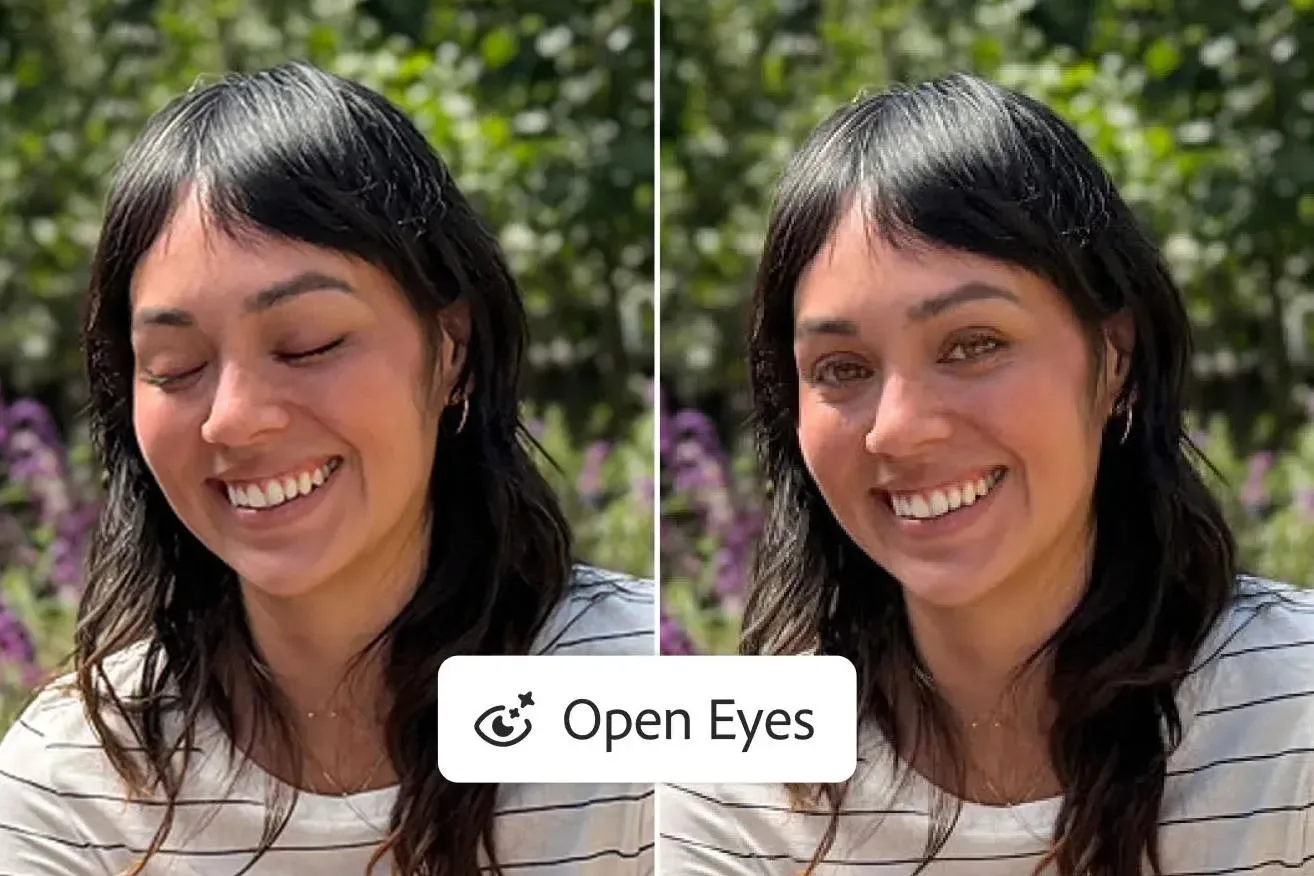
Adobe has quietly but significantly upgraded the mobile version of Lightroom by integrating generative AI to fix closed eyes in photos. According to The Verge, this new capability allows users to restore a subject's gaze with just a single tap, effectively rescuing portraits that were previously ruined by a blink. The feature is now available on iOS, iPadOS, and Android devices, marking a major shift in how mobile photographers approach post-processing.
The implementation is surprisingly seamless for the end user. When the app detects one or more people with closed eyes, it automatically presents a new Open Eyes Quick Action. This appears as an icon overlaid on the image, giving you instant access to the generative fix without navigating through complex menus. It is a smart UI choice that reduces friction and encourages experimentation with the tool.
This is not the first time Adobe has tackled this specific problem. The company has offered similar functionality in Photoshop Elements for nearly a decade. However, the mobile implementation represents a leap in sophistication. As DPReview noted, earlier versions often sourced replacement eyes from other parts of the same image or required manual selection. The new generative model creates plausible eyes that match the lighting and angle of the original shot.
The implications for social media and casual photography are profound. Most smartphone users do not have the time or skill to manually paint over eyes in a desktop editor. By automating this process, Adobe is removing the biggest barrier to entry for high-quality portrait retouching. It turns a niche professional skill into a one-tap utility for everyone.
From a broader tech perspective, this highlights the rapid maturation of generative AI in consumer apps. We are moving past the novelty phase of AI image generation into practical utility. Tools that used to require hours of manual labor are now being compressed into seconds of automated computation. This trend is reshaping expectations for what mobile apps can achieve without heavy hardware requirements.
For professionals, this feature acts as a powerful time-saver during batch processing. Instead of manually correcting dozens of portraits, you can apply the fix instantly. It does not replace high-end retouching for magazine covers, but it drastically reduces the cleanup time for everyday shoots. The democratization of these tools is leveling the playing field between hobbyists and pros.
What this means for you: If you take portraits on your phone, you no longer need to delete photos where the subject blinked. Try this workflow: Import your batch of portraits into Lightroom Mobile, let the app flag the closed eyes, and apply the Quick Action to all flagged images at once. This can cut your editing time by half for group shots. You can also prompt your AI assistant to help you write a caption for the rescued photo by asking it to describe the subject's expression in the corrected image.
Ready to apply this tech at your business?
Viking Net helps teams in San Antonio and worldwide stay ahead.